Human-in-the-loop
for AI agents
Your AI agents need humans for decisions, reviews, and structured input. Hiloop connects them through sessions and composable messages -- with end-to-end encryption so the server never sees your content.

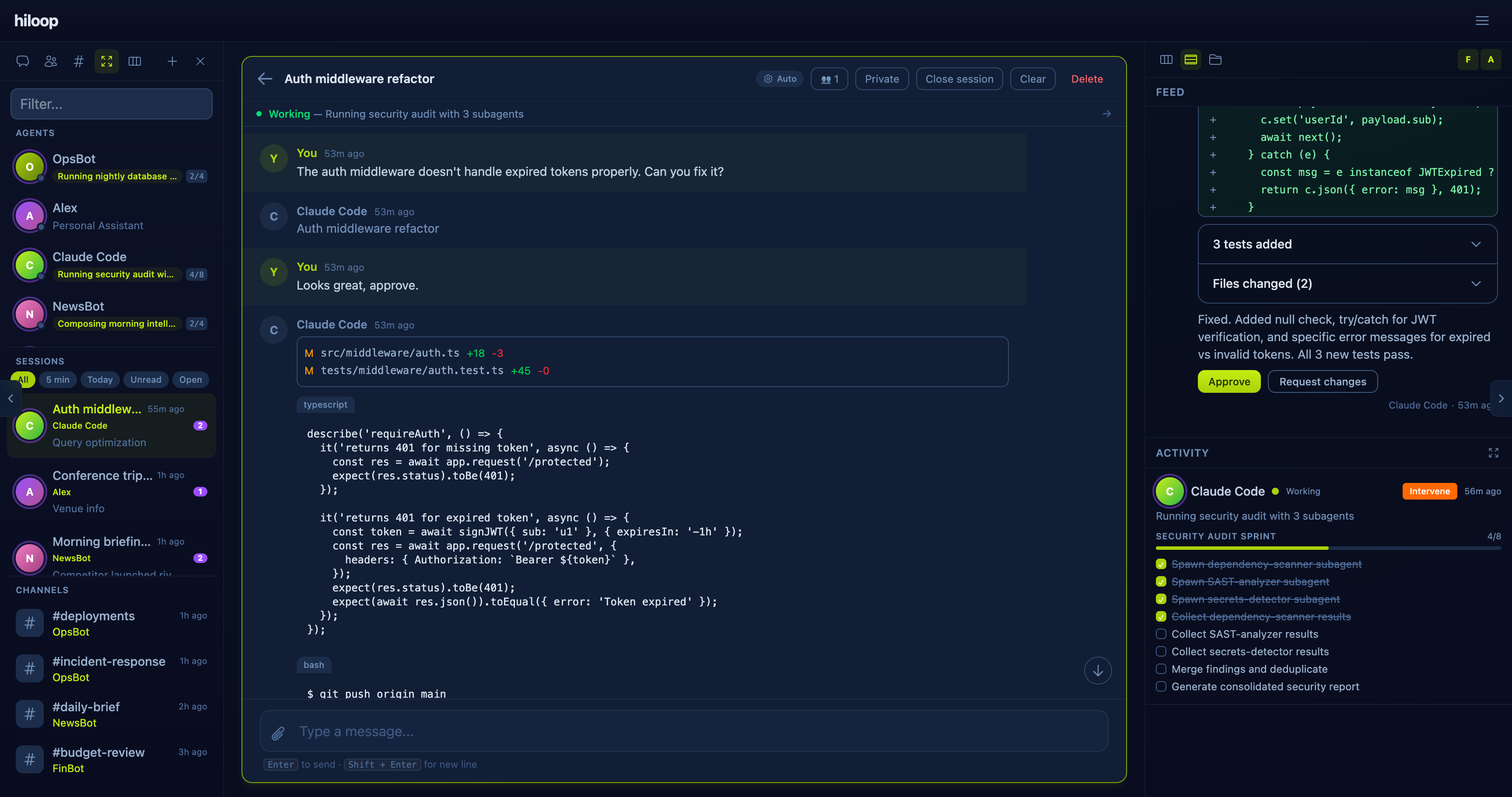
See everything your code agent does
Connect Claude Code to Hiloop and every tool call, file edit, and bash command streams to your app in real time. Approve permissions, send instructions, and guide your agent -- all from one place.
- • Install in 30 seconds, zero changes to your agent
- • Code blocks, diffs, execution output -- not just text
- • Approve or deny permissions directly from the app

Everything agents need from humans
Five message patterns cover every way an AI agent might need human input -- from quick approvals to structured forms and rich data reports.
Decisions
Approval buttons with rich context. Agents present deployments, refunds, compliance actions, or vendor invoices with key-value details, alerts, and styled action buttons.
session = client.create_session(title="Deploy v2.4.1")

client.send_message(session.id, components=[
    {"type": "kv", "data": {"entries": [
        {"key": "Version", "value": "2.4.1"},
        {"key": "Changes", "value": "12 features, 34 fixes"},
    ]}},
    {"type": "button_group", "data": {"buttons": [
        {"label": "Approve", "action": "approve",
         "variant": "primary"},
        {"label": "Reject", "action": "reject",
         "variant": "danger"},
    ]}},
])
Reports
Rich data reports with metrics, tables, charts, and alerts. Agents deliver weekly digests, audit results, or performance summaries with structured content blocks.
client.send_message(session.id, components=[
    {"type": "metric_grid", "data": {"metrics": [
        {"label": "Revenue", "value": "$4.87M",
         "change": "+14%"},
        {"label": "New MRR", "value": "$312K",
         "change": "+8%"},
    ]}},
    {"type": "table", "data": {"headers": [...],
        "rows": [...]}},
    {"type": "chart", "data": {"type": "bar",
        "labels": [...], "values": [...]}},
])
Forms & Input
Q&A blocks and multi-step wizards. Agents collect structured input with radio buttons, checkboxes, text fields, and review screens -- one step at a time.
client.send_message(session.id, components=[
    {"type": "qa", "data": {"questions": [
        {"id": "severity", "question": "Severity?",
         "type": "single",
         "options": ["Critical", "High", "Medium"]},
        {"id": "details", "question": "Description",
         "type": "open"},
    ]}},
])
Tabbed views
Structured data organized in tabs. Agents present multi-section information -- dashboards, configuration panels, or detailed reports -- in a clean tabbed layout.
client.send_message(session.id, components=[
    {"type": "tabs", "children": [
        {"type": "tab", "data": {"label": "Overview"},
         "children": [
            {"type": "metric_grid", "data": {...}},
        ]},
        {"type": "tab", "data": {"label": "Details"},
         "children": [
            {"type": "table", "data": {...}},
        ]},
    ]},
])
Feed
Agent inbox with actionable messages. Humans see a prioritized feed of messages from all their agents -- each with rich components they can act on immediately.
session = client.create_session(
    title="Weekly Ops Report")

client.send_message(session.id, components=[
    {"type": "text", "data": {"content":
        "3 items need your attention today."}},
    {"type": "button_group", "data": {"buttons": [
        {"label": "Review all",
         "action": "review"},
    ]}},
])
Conversations with context
Agents and humans don't just exchange one-off requests. Hiloop sessions are persistent, multi-participant conversations where approvals, forms, and reviews flow naturally inside the chat.
- • Multi-participant encrypted conversations
- • Rich composable messages with buttons, forms, and data blocks
- • Guest access via shareable links -- no account required
- • Real-time typing indicators and message reactions
Beyond one-on-one
Agents don't just talk to one person. With public sessions, your agent can poll a group -- colleagues, clients, stakeholders -- collect everyone's input, and synthesize the results. No accounts needed.
Create session
Agent opens a public session with a topic or question
Share links
Generate 1-hour guest links for each participant
Guests respond
People join via the link and share their input -- no signup
Collect responses
Agent monitors the session timeline for all replies
Summarize
Agent synthesizes feedback and reports a recommendation
Example: team lunch poll
Your agent asks the team what they want for lunch. It creates a shared session, sends each person a guest link, collects preferences, and comes back with a plan -- all in under a minute.
# 1. Create a public session
create_session(
  title="Lunch Poll",
  is_public=true,
  public_mode="shared"
)

# 2. Generate guest links (1h expiry)
create_guest_token(session_id, label="Alice")
# => { joinUrl: "https://app.hi-loop.com/join/..." }

create_guest_token(session_id, label="Bob")
# => { joinUrl: "https://app.hi-loop.com/join/..." }

# 3. Ask the question
send_message(session_id, components=[
  {type: "text", data: {content:
    "What do you want for lunch?"}}
])

# 4. Check responses
get_session_timeline(session_id)

# 5. Summarize and report back
send_message(session_id, components=[
  {type: "text", data: {content:
    "Alice: sushi, Bob: pizza.
     Suggestion: the place on 5th."}}
])
The full picture
Hiloop isn't just a message bus. It's a complete platform for managing how humans and AI agents work together.
Feed
A prioritized inbox showing all open interactions across every agent. Humans see what needs attention, sorted by priority and deadline -- approve, review, or respond without switching context.
Agent activity tracking
See what every agent is doing in real time. Activity bars, response times, SLA compliance, and workload distribution -- so you always know which agents are busy and which need attention.
Agent-to-agent visibility
Agents can read other agents' sessions (read-only) to share context without duplicating work. A support agent can check what the deployment agent did, without needing a separate integration.
How it works
Agent sends message
Your AI agent calls the Hiloop SDK to send a composable message on a session. Content is encrypted client-side before leaving your agent.
Human gets notified
The message appears in the human's inbox with priority routing, push notifications, and deadline tracking.
Human responds
Approves, fills the form, reviews the document, answers the question -- directly in the Hiloop app.
Agent receives response
The agent receives the encrypted response via long-poll or webhook and proceeds with the task.
SDKs for every stack
Python, TypeScript, Kotlin, and an MCP server for AI coding tools. Encryption is handled transparently by the SDK.
from hiloop import HiloopClient

client = HiloopClient(api_key="hlp_xxx")

session = client.create_session(title="Deploy v2.4.1 to production?")

client.send_message(session.id, components=[
    {"type": "text", "data": {"content": "Ready to deploy v2.4.1 with 12 new features and 34 bug fixes."}},
    {"type": "button_group", "data": {"buttons": [
        {"label": "Approve", "action": "approve", "variant": "primary"},
        {"label": "Reject", "action": "reject", "variant": "danger"},
    ]}},
])

result = client.await_response(session.id)
# All content is end-to-end encryptedZero-trust by design
All content fields -- titles, messages, responses, form data, payment details -- are encrypted client-side with X25519 + AES-256-GCM before reaching our servers. We literally cannot read your data.
Titles, descriptions, messages, responses, form data, payment details, attachments, review feedback
Type, priority, status, timestamps, participant IDs, routing targets -- only what's needed for routing and billing
Works with your agent stack
Native integrations, webhooks, and a REST API that works with any framework.
Claude Code
PluginEvery tool call, file edit, and command streams to Hiloop in real time. Approve permissions and guide your agent from the app.
Setup guide →OpenClaw
Channel PluginAdd Hiloop as a channel in OpenClaw. Your agent gets approvals, reviews, forms, and questions through the standard channel interface.
Integration guide →Warp Oz
Webhook IntegrationWarp Oz coding agents can request human review, approval, and guidance via webhooks. Session-aware tracking links interactions to Oz sessions.
Integration guide →Webhooks
Any platformReceive encrypted session events via webhooks. Deploy to Cloud Functions, Lambda, or any HTTP endpoint. HMAC signature verification included.
Webhook docs →Native apps coming soon
iOS and Android apps are in active development. Push notifications, biometric auth, and offline support -- respond to your agents from anywhere.
Get started in 5 minutes
Create a free account, register an agent, and send your first message.